---
title: Amazon Product Images Size and Best Practices 2026
description: Discover the latest Amazon product images size requirements, and the best practices to maximise conversion on your listings.
image: https://www.wakecommerce.co.uk/hubfs/Blog%20image%20design%20-%20Body%20-%20Small%20Margin%20-%20Amazon%20Product%20Image%20Requirements%20(General)%20(1).png
---
[](https://www.wakecommerce.co.uk)
- Services
- [Complete channel management for Amazon Vendor Central ](https://www.wakecommerce.co.uk/amazon-vendor-central-management)
- [Chargeback & Shortage Claim Recovery for Amazon Vendors ](https://www.wakecommerce.co.uk/profitguard-amazon-chargeback-recovery)
- [A creative agency within an Amazon agency ](https://www.wakecommerce.co.uk/amazon-listing-optimisation)
- [Full funnel Amazon Ads, DSP + AMC management ](https://www.wakecommerce.co.uk/amazon-ads-management)
- [Pricing](https://www.wakecommerce.co.uk/pricing)
- [Blog](https://www.wakecommerce.co.uk/blog)
[Contact Us](https://www.wakecommerce.co.uk/contact-us)
- Services
- [](https://www.wakecommerce.co.uk/amazon-vendor-central-management)
- [](https://www.wakecommerce.co.uk/profitguard-amazon-chargeback-recovery)
- [](https://www.wakecommerce.co.uk/amazon-listing-optimisation)
- [](https://www.wakecommerce.co.uk/amazon-ads-management)
- [Pricing](https://www.wakecommerce.co.uk/pricing)
- [Blog](https://www.wakecommerce.co.uk/blog)
- [Contact Us](https://www.wakecommerce.co.uk/contact-us)
## Enquiry Form
%20(1).png)
# Amazon Product Images Size and Best Practices 2026
by **Danielle Thompson** 22 December 2025
Table of contents
- [Why Amazon Listing Images Are So Important](https://www.wakecommerce.co.uk/blog/amazon-product-images-size-and-best-practices-2026#WhyAmazonListingImagesAreSoImportant)
- [Amazon Product Images Size Requirements](https://www.wakecommerce.co.uk/blog/amazon-product-images-size-and-best-practices-2026#Imagesizerequirements)
- [Amazon Main Image Requirements](https://www.wakecommerce.co.uk/blog/amazon-product-images-size-and-best-practices-2026#Mainimagerequirements)
- [Amazon Product Image Requirements - General](https://www.wakecommerce.co.uk/blog/amazon-product-images-size-and-best-practices-2026#Requirementsgeneral)
- [6 Best Practices for Amazon Product Images](https://www.wakecommerce.co.uk/blog/amazon-product-images-size-and-best-practices-2026#Bestpractices)
- [Amazon Product Images Size FAQs](https://www.wakecommerce.co.uk/blog/amazon-product-images-size-and-best-practices-2026#FAQs)
Your Amazon listing images are like a digital shop window display. Get it right, and you’ll be able to convert more casual browsers into buyers. Get it wrong, and your products could be ignored by customers, or even suppressed by Amazon.
In this guide, we’ll explore up-to-date Amazon product image size requirements, the more general image standards you’ll need to bear in mind, and six best practices we use to help our clients post the most effective listing images possible.
## Why Amazon Listing Images Are So Important
Though you’re intimately familiar with your products, many in your target audience aren’t. This is the crux of why Amazon listing images are one of the most important variables in [Amazon listing optimisation](https://www.wakecommerce.co.uk/blog/amazon-listing-optimisation-the-ultimate-guide-for-2025), especially if you’re not selling in physical retail stores.
Shoppers can’t touch or try out your product over Amazon, so the visual content you provide is going to act as a substitute for a real, in-person inspection. The quality of this experience will have a major impact on your Amazon conversion rates, whether that’s via your [Amazon advertising](https://www.wakecommerce.co.uk/blog/amazon-advertising-the-complete-guide-for-vendors-in-2025) campaigns or organically.
The importance of quality product images is backed up by ecommerce research across industries and selling platforms. [Salsify’s 2025 Consumer Research Report](https://www.salsify.com/hubfs/2025/Salsify%202025%20Consumer%20Research%20Report.pdf) reported that 77% of their consumer survey respondents considered product images and videos as part of their typical purchase journey.
[](https://www.wakecommerce.co.uk/blog/sweet-success-how-we-doubled-traffic-and-conversion-for-monty-bojangles)
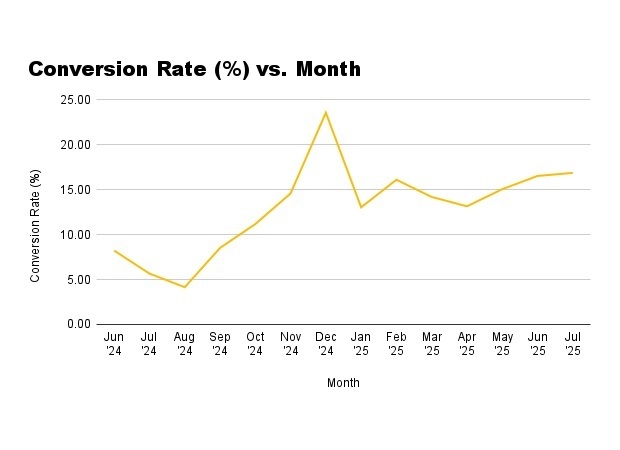
We regularly see the impact of quality Amazon images in the work we carry out for clients. In one project for a confectionary brand, we achieved a 65% increase in conversion rate and a 154% increase in purchases using content optimisations alone. [Check out the case study here](https://www.wakecommerce.co.uk/blog/sweet-success-how-we-doubled-traffic-and-conversion-for-monty-bojangles).
With such a big impact on how shoppers perceive your products, investing in high-quality Amazon product images is one of the most effective ways to quickly move the needle.
## Amazon Product Images Size Requirements
Currently, the minimum Amazon product images size is at least 500 pixels on the longest side. However, this will only prevent your uploaded images from being rejected, and won’t necessarily ensure the best customer experience.
To enable Amazon’s zoom function, where shoppers can zoom in on product features just by mousing over the image, your images must be at least 1000 x 1000 pixels.
To ensure you’re accommodating for larger screens, enabling zoom functionality, and giving your audience detailed, high-quality visuals, we recommend using 3000 x 3000 pixel images wherever possible.
While larger Amazon listing images tend to equate a clearer understanding of your products, it’s important to note that Amazon will reject any image files larger than 10MB. If your best product images exceed this, you can usually use an online image compression tool to greatly reduce the file size while still retaining image quality.
> Want to get the most from your Amazon listing images? Our expert Amazon content services help turn your best assets into high-impact Amazon listing images to maximise engagement and sales.
>
>
>
> [](https://www.wakecommerce.co.uk/hs/cta/wi/redirect?encryptedPayload=AVxigLL0j9Oq2A9zMqyHB6Hlogx0lB50ejaQ2XvCvrGtDg8nQm%2F%2Bgc9KBFXte0a%2FFP4OUW98XHH3KTVNLbu6L2JjXruaVwXel5r5RWUW5mKOz2vTWhwN3XZyNwMJ06vBx7QgCjFN9So8HUNV8eIHHc7bb0n1afw0bUcgql43%2FxH1NE1UhxDv16t26f5SJW4vYlExozvSRjeQUYmLGBhO9uG5%2B%2BLkB7wEz7uZi8MxY2Uc4WKChQ%3D%3D&webInteractiveContentId=240954877173&portalId=26614020)
## Amazon Main Image Requirements
.png?width=1536&height=1024&name=Blog%20image%20design%20-%20Body%20-%20Small%20Margin%20-%20Amazon%20Main%20Image%20Requirements%20(1).png)
On top of these general size requirements, Amazon has a specific set of rules for main listing images you’ll need to follow to ensure your listing meets their policies.
These rules are more restrictive than the policies regarding what you can include in the rest of your supporting infographics, so make sure these are kept in mind when you’re organising assets and preparing to launch new products.
All main product images on Amazon must:
- Show the product on a plain white background (RGB: 255, 255, 255).
- Show the product taking up 85% of the total image area.
- Have no text, logos, colour blocks, or other graphics either in the background or covering the product. Logos or graphics that are a part of the product itself are fine.
- Contain the whole product within the frame of the image, without cutting off any part with the borders.
- Not show accessories or props that aren’t included with the product.
- If the product has multiple pieces, show every piece relevant in size, with no one piece enlarged.
- Exclude all packaging, unless it’s important to the product (e.g. an included carry case).
You’ve probably noticed that while the majority of Amazon listings follow these rules, there are still plenty of main images that don’t, showing stylised infographic-style or lifestyle images. This isn’t a cue for you to go against Amazon policy.
Like with anything, Amazon is inconsistent at the best of times with its policies around listing images, and there’ll always be certain listings that slip through the net. Although getting a non-compliant main image past Amazon’s guardrails may boost engagement at first, it will also increase the risk of having your listing suspended when you need it least.
Remember that certain product categories have more specific rules about how they need to be displayed. For example, all footwear products need to have a single shoe facing left and positioned at a 45-degree angle to the camera, while following all the other main image guidelines. To ensure you’re abiding by Amazon policy, be sure to check the [official product page style guides](https://sellercentral.amazon.com/help/hub/reference/external/G200270100) for your product category.
## Amazon Product Image Requirements - General
%20(1).png?width=1536&height=1024&name=Blog%20image%20design%20-%20Body%20-%20Small%20Margin%20-%20Amazon%20Product%20Image%20Requirements%20(General)%20(1).png)
Past the main product image, Amazon also has a number of policies you’ll need to bear in mind for your entire listing image gallery.
Though these generally aren’t as strict as the rules regarding main images, they’re still part of Amazon policy, and have the potential to cause a listing to be taken down if they’re not followed.
Here are the more general product image requirements on Amazon you’ll need to follow when organising listing galleries.
All listing images must:
- Give an accurate representation of the product that’s being sold.
- Match the description given in the product title.
- Not contain any star ratings, quotes from customer reviews, or other graphics intended to bypass the official [Amazon reviews system](https://www.wakecommerce.co.uk/blog/amazon-vine-the-ultimate-guide-for-vendors).
- Not contain any third-party claims that may not reflect the Amazon shopping experience - warranty information or free shipping guarantees are strictly prohibited.
- Not contain any pricing or discount details that may not reflect the Amazon shopping experience.
- Not contain any of Amazon’s logos, watermarks, or anything that may be confusingly similar to Amazon trademarks. This includes words like “Prime” or “Alexa”.
- Not contain any [Amazon badges](https://www.wakecommerce.co.uk/blog/amazon-badges-what-they-are-and-how-to-earn-them), e.g. “Amazon’s choice”, “Best Seller”, or “Climate Pledge Friendly”.
- Not contain any information that might date the product, e.g. “new”, “just released” etc.
> ###### Managing a large Amazon catalogue? Don’t let a lack of bandwidth get your products de-listed. Our channel management services ensure all your images are Amazon-compliant so you can operate in total peace of mind.
>
>
>
> [](https://www.wakecommerce.co.uk/hs/cta/wi/redirect?encryptedPayload=AVxigLIetubqEGgOpnZjn42I%2FhnRnjKWhDjCYKKILHbixbxvPwD%2Bsu85eLx4OEWkBkuqYgOoq%2F5HgovpAjW0XJEU4kuEizFmXwnovU5O94XZZUJCv9WP4WD%2BIsky8bMuNiorMVyWmSEVT%2FcC3dIBn48Ua47YM%2BIMpEKi5zvBdr2DnvKMLj5bnOyeqh380KszIhfiKRqrIkIbUnqZ0cDuchAuSIMie763QDEUqrZYtXNqqXgkng%3D%3D&webInteractiveContentId=240929016028&portalId=26614020)
## 6 Best Practices for Amazon Product Images
Understanding and meeting Amazon product image requirements is crucial, but this is only a small part of making sure your Amazon product images are doing their job.
When they’re created and organised correctly, product images for Amazon can be a major factor in your organic click-through and engagement, working alongside good advertising and operations to create a tangible boost in sales.
Here are six best practices for Amazon product images we use to create high-impact listings, and help our clients achieve the best performance possible.
### Put Compliance Before Creativity
Though standing out from the crowd counts for a lot, it’s not worth much if your listings are in danger of getting struck off by Amazon due to simple mistakes in your image curation.
Before investing in any lifestyle shoots and infographics, it’s essential that you closely review Amazon’s technical and content rules, and incorporate these into a standard operating procedure for creating Amazon product images.
By making sure every product gallery covers this fundamental first step, you’ll make all future image optimisation that much easier.
### Make Sure You’re Using Zoom-Eligible Image Dimensions
To guarantee the best user experience, we recommend treating zoom-eligible dimensions as an early fundamental check box, just like meeting Amazon’s basic main image rules.
As we mentioned earlier, the minimum image dimensions that enable zooming are 1000 x 1000 pixels. However, we always ask our clients for assets suitable for Amazon product images of 3000 x 3000 pixels. This ensures consistently sharp visuals whether the shopper is using desktop, tablet, or mobile, as anything smaller can come out looking fuzzy or unprofessional on certain high-resolution screens.
Using larger product images for Amazon also provides greater flexibility for use in ads, recommendations, and quality mobile display.
### Show Your Product From Multiple Angles
Product images act as a substitute for the experience of being able to physically inspect a product in a store.
With this in mind, you should use Amazon listing images to show your product from multiple angles and help recreate that in-person experience that helps the shopper get a more complete idea of what your product is.
*“Showcasing the product in action is essential, especially for fashion, apparel, and tech gadgets. Displaying the product in different contexts and use cases effectively highlights its size, proportions, and versatility.”*
\- Yashar Aktunch, Graphic Designer
Here are some examples of shots to consider including for each listing gallery:
- Front and rear views of the product.
- Angled perspective shots that show how the product will look in use.
- Close-ups of important details, e.g. controls, cable ports, or fastenings.
- For electronics or technical items, consider cutaway graphics that show the product’s internal mechanisms.
By providing this kind of variety in your Amazon listing images, you’ll reduce uncertainty in shoppers who aren’t quite ready to convert, and help reduce returns caused by unmet expectations.
### Use Quality Infographics
On Amazon, people browse and make decisions quickly, and you’ll have precious little time to convince a shopper that your product is what they’re looking for.
Your Amazon product images can act as a powerful extension of your product copy, and a great tool for quickly communicating a product’s main USPs in the short decision-making timeframe that ecommerce brands have to contend with.
Some key product details that infographic-style product images are great at communicating include:
- Product dimensions.
- Materials and benefits.
- Compatibility.
- Before / After product use cases.
- Technical performance stats.
Note that although infographic-style images are great for communicating information, your Amazon listing images are still a visual medium.
Be sure to aim for space efficiency in your text placement, and strike a balance between visual storytelling and text that links each product feature to a tangible benefit.
### Context and Emotion With Lifestyle Images
Lifestyle images are another staple of effective product images for Amazon, and serve two important functions.
First, it will give your target audience a better idea of how your product will fit in with their day-to-day lives, and give important context that can further convince shoppers towards a conversion.
Second, lifestyle images can work to create an emotional connection, communicate your brand identity, and foster more trust and value than you’ll be able to achieve with images that have a more narrow focus on the product.
*“People buy from people and they want to see themselves in your product images. We work with our designers to showcase a variety of people in our clients images and are always pushing the boundaries here.”*
\- Danielle Thompson, Head of Content
Here are a few examples of how lifestyle images can be used to contextualise products in different niches:
Home and Kitchen: Chopping boards in use with fresh ingredients.
Fitness and Sports: Resistance bands or weights in use during a home workout.
Beauty and Personal Care: A skincare product being used at the bathroom mirror.
Baby and Parenting: A nightlight in a softy-lit nursery.
Garden and Outdoor: Garden furniture in use on a patio.
Pet Products: A dog bed with a dog resting inside.
Electronics: A power bank charging a phone or tablet while traveling.
### Continually Test and Improve
Like any element of content optimisation, you should ideally use your Amazon product images as a performance asset, rather than a one-off design task.
Different audience segments will react differently both to individual assets and how they’re curated on your listings. To get the most value possible from your product images, try to make space for regular experimentation, focusing on variables like:
- Angles and framing, trying different selections of product surfaces.
- Measurement infographics vs showing scale with lifestyle images.
- Indoor vs outdoor contexts for lifestyle images (particularly useful for kitchen and fitness products).
- Favouring generalist product photography vs close-ups of features or materials.
- Fine details vs bold, high-contrast imagery.
- Standard, universal image crop vs a tighter, more mobile-friendly version with less peripheral distractions.
There are many more possibilities for experimentation depending on your product, audience segment, and other variables. By maintaining an attitude of constant experimentation, you’ll be able to identify the weaker practices in your branded imagery, and find new ideas that deliver the best possible results.
## Amazon Product Images Size FAQs
Amazon product images are one of the most important things you can optimise to foster stronger customer relationships and raise engagement and conversions across your listings.
By making sure you adhere to technical Amazon image requirements, using quality imagery that connects with your audience, and testing often, you’ll be able to ensure every image is returning the maximum value possible.
We hope this guide has given you a good starting point for organising your Amazon product images and creating new assets for better organic marketing. For more support with optimising your Amazon content, be sure to [check out our other blog posts](https://www.wakecommerce.co.uk/blog), or discover how our Amazon content services can help you.
[](https://www.wakecommerce.co.uk/hs/cta/wi/redirect?encryptedPayload=AVxigLL0j9Oq2A9zMqyHB6Hlogx0lB50ejaQ2XvCvrGtDg8nQm%2F%2Bgc9KBFXte0a%2FFP4OUW98XHH3KTVNLbu6L2JjXruaVwXel5r5RWUW5mKOz2vTWhwN3XZyNwMJ06vBx7QgCjFN9So8HUNV8eIHHc7bb0n1afw0bUcgql43%2FxH1NE1UhxDv16t26f5SJW4vYlExozvSRjeQUYmLGBhO9uG5%2B%2BLkB7wEz7uZi8MxY2Uc4WKChQ%3D%3D&webInteractiveContentId=240954877173&portalId=26614020)
### What image dimensions should you use for Amazon?
Amazon’s absolute minimum requirement is 500 pixels on the longest side, which prevents rejection, but doesn’t deliver an ideal customer experience. To activate Amazon’s zoom feature (now considered essential for a positive user experience) your images must be at least 1000 x 1000 pixels. For the best results across desktop, mobile, and high-resolution displays, we recommend treating 3000 x 3000 pixels as the minimum. Larger images improve clarity, professionalism, and flexibility for future use in ads or enhanced brand content.
### Is there a file size limit for Amazon images?
Yes. Amazon will reject any image file larger than 10 MB. The images must also be an accepted file format (JPEG, TIFF, PNG, GIF). If your images exceed this limit, you should compress them using professional or online compression tools. Image compression tools can dramatically shrink file size while maintaining sharpness, ensuring your gallery stays compliant without sacrificing visual impact.
### What are the requirements for Amazon main product images?
Amazon’s main image rules are strict and must be followed precisely. The product must appear on a pure white background (RGB 255, 255, 255) and take up approximately 85% of the image area. The entire product must be visible with no cropping. You cannot add text, graphics, color blocks, or promotional overlays. Accessories or props that are not included with the purchase are not allowed. Packaging should only appear if it is an essential part of the product (e.g. a carry case).
### Does product category matter when selecting Amazon images?
Yes. Many Amazon categories have additional visual requirements on top of the standard rules. For example, footwear images require a single shoe facing left at a 45-degree angle. Other categories such as clothing, jewelry, and food also have their own styling standards. Always consult your category’s official Amazon style guide to avoid rejections or listing suppression.
### What are the general gallery image restrictions I should follow?
All images must accurately represent the product and align with the product title and description. You cannot include star ratings, customer review quotes, third-party warranty claims, shipping promises, pricing, or discount information. You also cannot display Amazon logos, Amazon-related terms like “Prime” or “Alexa,” or badges like “Amazon’s Choice” or “Best Seller.” Violating these rules can result in suppressed images or deactivated listings.

## Insights to help Grow Profit
Don't miss out on the latest strategies for growing your brand sustainably on Amazon. Subscribe now!
About the Author
Danielle is a true content marketing veteran who has worked on both sides of the Amazon-brand relationship.
After 3 years as a Lead Site Merchandiser for Amazon, she filled a number of in-house and agency-side roles in ecommerce marketing, before joining Wake in 2024 as our Head of Content.
Today, she leads an elite team of Amazon content professionals to craft smart and scalable brand narratives for household names and growing global brands. With every new project, she combines Wake’s “data-first” philosophy with two decades of marketing experience, leveraging original audience insights and a peerless intuition to craft content that always gets results.
## Related Blog Posts
October 13, 2023
###### [How to Optimise Amazon Vendor Catalogue & Product Listings?](https://www.wakecommerce.co.uk/blog/amazon-product-listing-optimisation-for-vendor-central)
[Continue reading](https://www.wakecommerce.co.uk/blog/amazon-product-listing-optimisation-for-vendor-central)
January 30, 2025
###### [How to Optimise Amazon Titles on Vendor Central](https://www.wakecommerce.co.uk/blog/the-ultimate-guide-to-optimising-product-titles-for-amazon-vendors)
[Continue reading](https://www.wakecommerce.co.uk/blog/the-ultimate-guide-to-optimising-product-titles-for-amazon-vendors)
June 30, 2026
###### [The 2026 Amazon Title Character Limit Update and What It Means for You](https://www.wakecommerce.co.uk/blog/the-2026-amazon-title-character-limit-update-and-what-it-means-for-you)
[Continue reading](https://www.wakecommerce.co.uk/blog/the-2026-amazon-title-character-limit-update-and-what-it-means-for-you)
October 28, 2025
###### [Sweet Success: How We Supercharged Organic Sales for Monty Bojangles](https://www.wakecommerce.co.uk/blog/sweet-success-how-we-doubled-traffic-and-conversion-for-monty-bojangles)
[Continue reading](https://www.wakecommerce.co.uk/blog/sweet-success-how-we-doubled-traffic-and-conversion-for-monty-bojangles)
May 23, 2025
###### [Case Study: Content Optimisation Return on Investment](https://www.wakecommerce.co.uk/blog/amazon-content-optimisation-case-study)
[Continue reading](https://www.wakecommerce.co.uk/blog/amazon-content-optimisation-case-study)
September 29, 2026
###### [Cards, Cases and Cosy Season: What Amazon UK Was Searching For in September 2026](https://www.wakecommerce.co.uk/blog/cards-cases-and-cosy-season-what-amazon-uk-was-searching-for-in-september-2026)
[Continue reading](https://www.wakecommerce.co.uk/blog/cards-cases-and-cosy-season-what-amazon-uk-was-searching-for-in-september-2026)
September 9, 2025
###### [Amazon Listing Optimisation: The Ultimate Guide for 2026](https://www.wakecommerce.co.uk/blog/amazon-listing-optimisation-the-ultimate-guide-for-2025)
[Continue reading](https://www.wakecommerce.co.uk/blog/amazon-listing-optimisation-the-ultimate-guide-for-2025)
May 25, 2026
###### [Satisfaction Guaranteed: How We Reduced an Aquarium Brand’s Amazon Return Rates by an Average of 68%](https://www.wakecommerce.co.uk/blog/satisfaction-guaranteed-how-we-reduced-an-aquarium-brands-amazon-return-rates-by-an-average-of-68)
[Continue reading](https://www.wakecommerce.co.uk/blog/satisfaction-guaranteed-how-we-reduced-an-aquarium-brands-amazon-return-rates-by-an-average-of-68)
March 24, 2026
###### [What's Hot on Amazon UK: A Keyword Round-Up for March 2026](https://www.wakecommerce.co.uk/blog/whats-hot-on-amazon-uk-a-keyword-round-up-for-march-2026)
[Continue reading](https://www.wakecommerce.co.uk/blog/whats-hot-on-amazon-uk-a-keyword-round-up-for-march-2026)
June 23, 2026
###### [What's Hot on Amazon UK: A Keyword Round-Up for 6th–13th June 2026](https://www.wakecommerce.co.uk/blog/whats-hot-on-amazon-uk-a-keyword-round-up-for-6th-13th-june-2026)
[Continue reading](https://www.wakecommerce.co.uk/blog/whats-hot-on-amazon-uk-a-keyword-round-up-for-6th-13th-june-2026)
[](https://www.wakecommerce.co.uk/)
- [Vendor+](https://www.wakecommerce.co.uk/amazon-vendor-central-management)
- [ProfitGuard](https://www.wakecommerce.co.uk/profitguard-amazon-chargeback-recovery)
- [ContentStudio](https://www.wakecommerce.co.uk/amazon-listing-optimisation)
- [ads+dsp](https://www.wakecommerce.co.uk/amazon-ads-management)
- [Blog](https://www.wakecommerce.co.uk/blog)
- [Contact us](https://www.wakecommerce.co.uk/contact-us)
020 3885 0777 | [hello@wakecommerce.co.uk](mailto:hello@wakecommerce.co.uk)



© Copyright 2026 - Wake Commerce Ltd
```json
{
"@context" : "https://schema.org",
"@type" : "BlogPosting",
"author" : {
"@type" : "Person",
"name" : "Danielle Thompson",
"url" : "https://www.wakecommerce.co.uk/blog/author/danielle-thompson"
},
"dateModified" : "2026-05-26T14:28:21.907Z",
"datePublished" : "2025-12-22T13:51:23.000Z",
"headline" : "Amazon Product Images Size and Best Practices 2026",
"image" : [ "https://www.wakecommerce.co.uk/hubfs/Blog%20image%20design%20-%20Body%20-%20Small%20Margin%20-%20Amazon%20Product%20Image%20Requirements%20(General)%20(1).png" ],
"mainEntityOfPage" : {
"@id" : "https://www.wakecommerce.co.uk/blog/amazon-product-images-size-and-best-practices-2026",
"@type" : "WebPage"
},
"publisher" : {
"@type" : "Organization",
"logo" : {
"@type" : "ImageObject",
"url" : "https://www.wakecommerce.co.uk/hubfs/Wake_2023/Images/WAKE_Logo.png"
},
"name" : "Wake Commerce Ltd"
}
}
```
```json
{
"@context" : "https://schema.org",
"@type" : "BlogPosting",
"author" : {
"@type" : "Person",
"description" : "Danielle is a true content marketing veteran who has worked on both sides of the Amazon-brand relationship. After 3 years as a Lead Site Merchandiser for Amazon, she filled a number of in-house and agency-side roles in ecommerce marketing, before joining Wake in 2024 as our Head of Content. Today, she leads an elite team of Amazon content professionals to craft smart and scalable brand narratives for household names and growing global brands. With every new project, she combines Wake’s “data-first” philosophy with two decades of marketing experience, leveraging original audience insights and a peerless intuition to craft content that always gets results.",
"name" : "Danielle Thompson",
"sameAs" : "https://www.linkedin.com/in/danielle-thompson-b034364/"
},
"citation" : {
"@type" : "CreativeWork",
"description" : "77% of their consumer survey respondents considered product images and videos as part of their typical purchase journey.",
"name" : "Salsify 2025 Consumer Research Report",
"url" : "https://www.salsify.com/hubfs/2025/Salsify%202025%20Consumer%20Research%20Report.pdf"
},
"dateModified" : "2025-12-23",
"datePublished" : "2025-12-23",
"description" : "Discover the latest Amazon product images size requirements, and the best practices to maximise conversion on your listings.",
"hasPart" : [ {
"@type" : "FAQPage",
"mainEntity" : [ {
"@type" : "Question",
"acceptedAnswer" : {
"@type" : "Answer",
"text" : "Amazon’s absolute minimum requirement is 500 pixels on the longest side, which prevents rejection, but doesn’t deliver an ideal customer experience. To activate Amazon’s zoom feature (now considered essential for a positive user experience) your images must be at least 1000 x 1000 pixels. For the best results across desktop, mobile, and high-resolution displays, we recommend treating 3000 x 3000 pixels as the minimum. Larger images improve clarity, professionalism, and flexibility for future use in ads or enhanced brand content."
},
"name" : "What image dimensions should you use for Amazon?"
}, {
"@type" : "Question",
"acceptedAnswer" : {
"@type" : "Answer",
"text" : "Yes. Amazon will reject any image file larger than 10 MB. The images must also be an accepted file format (JPEG, TIFF, PNG, GIF). If your images exceed this limit, you should compress them using professional or online compression tools. Image compression tools can dramatically shrink file size while maintaining sharpness, ensuring your gallery stays compliant without sacrificing visual impact."
},
"name" : "Is there a file size limit for Amazon images?"
}, {
"@type" : "Question",
"acceptedAnswer" : {
"@type" : "Answer",
"text" : "Amazon’s main image rules are strict and must be followed precisely. The product must appear on a pure white background (RGB 255, 255, 255) and take up approximately 85% of the image area. The entire product must be visible with no cropping. You cannot add text, graphics, color blocks, or promotional overlays. Accessories or props that are not included with the purchase are not allowed. Packaging should only appear if it is an essential part of the product (e.g. a carry case)."
},
"name" : "What are the requirements for Amazon main product images?"
}, {
"@type" : "Question",
"acceptedAnswer" : {
"@type" : "Answer",
"text" : "Yes. Many Amazon categories have additional visual requirements on top of the standard rules. For example, footwear images require a single shoe facing left at a 45-degree angle. Other categories such as clothing, jewelry, and food also have their own styling standards. Always consult your category’s official Amazon style guide to avoid rejections or listing suppression."
},
"name" : "Does product category matter when selecting Amazon images?"
}, {
"@type" : "Question",
"acceptedAnswer" : {
"@type" : "Answer",
"text" : "All images must accurately represent the product and align with the product title and description. You cannot include star ratings, customer review quotes, third-party warranty claims, shipping promises, pricing, or discount information. You also cannot display Amazon logos, Amazon-related terms like “Prime” or “Alexa,” or badges like “Amazon’s Choice” or “Best Seller.” Violating these rules can result in suppressed images or deactivated listings."
},
"name" : "What are the general gallery image restrictions I should follow?"
} ]
}, {
"@type" : "HowTo",
"name" : "How to Create Amazon Main Product Images",
"step" : [ {
"@type" : "HowToStep",
"text" : "Show the product on a plain white background (RGB: 255, 255, 255)."
}, {
"@type" : "HowToStep",
"text" : "Show the product taking up 85% of the total image area."
}, {
"@type" : "HowToStep",
"text" : "Have no text, logos, colour blocks, or other graphics either in the background or covering the product. Logos or graphics that are a part of the product itself are fine."
}, {
"@type" : "HowToStep",
"text" : "Contain the whole product within the frame of the image, without cutting off any part with the borders."
}, {
"@type" : "HowToStep",
"text" : "Not show accessories or props that aren’t included with the product."
}, {
"@type" : "HowToStep",
"text" : "If the product has multiple pieces, show every piece relevant in size, with no one piece enlarged."
}, {
"@type" : "HowToStep",
"text" : "Exclude all packaging, unless it’s important to the product (e.g. an included carry case)."
} ]
} ],
"headline" : "Amazon Product Images: Size Requirements & Best Practices",
"mainEntityOfPage" : {
"@id" : "#blogpost",
"@type" : "WebPage"
},
"mentions" : [ {
"@type" : "Quotation",
"author" : {
"@type" : "Person",
"jobTitle" : "Graphic Designer",
"name" : "Yashar Aktunch",
"sameAs" : "https://www.linkedin.com/in/yashar-aktunch-44a75b172/"
},
"text" : "Showcasing the product in action is essential, especially for fashion, apparel, and tech gadgets. Displaying the product in different contexts and use cases effectively highlights its size, proportions, and versatility."
}, {
"@type" : "Quotation",
"author" : {
"@type" : "Person",
"jobTitle" : "Head of Content",
"name" : "Danielle Thompson",
"sameAs" : "https://www.linkedin.com/in/danielle-thompson-b034364/"
},
"text" : "People buy from people and they want to see themselves in your product images. We work with our designers to showcase a variety of people in our clients images and are always pushing the boundaries here."
} ],
"speakable" : {
"@type" : "SpeakableSpecification",
"cssSelector" : [ ".blog-post-content" ]
}
}
```